The Wiki Your AI Maintains
The graph in your head, made visible. A folder of markdown the AI maintains for you, no coding required.
Carroll, B. (2026, May 8). The Wiki Your AI Maintains. Ask the Human. https://workiscode.com/articles/the-wiki-your-ai-maintains/
Carroll, Bert. "The Wiki Your AI Maintains." Ask the Human, May 8, 2026. https://workiscode.com/articles/the-wiki-your-ai-maintains/.
@misc{carroll2026the,
  title = {The Wiki Your AI Maintains},
  author = {Carroll, Bert},
  year = {2026},
  month = {may},
  publisher = {Ask the Human},
  url = {https://workiscode.com/articles/the-wiki-your-ai-maintains/}
} 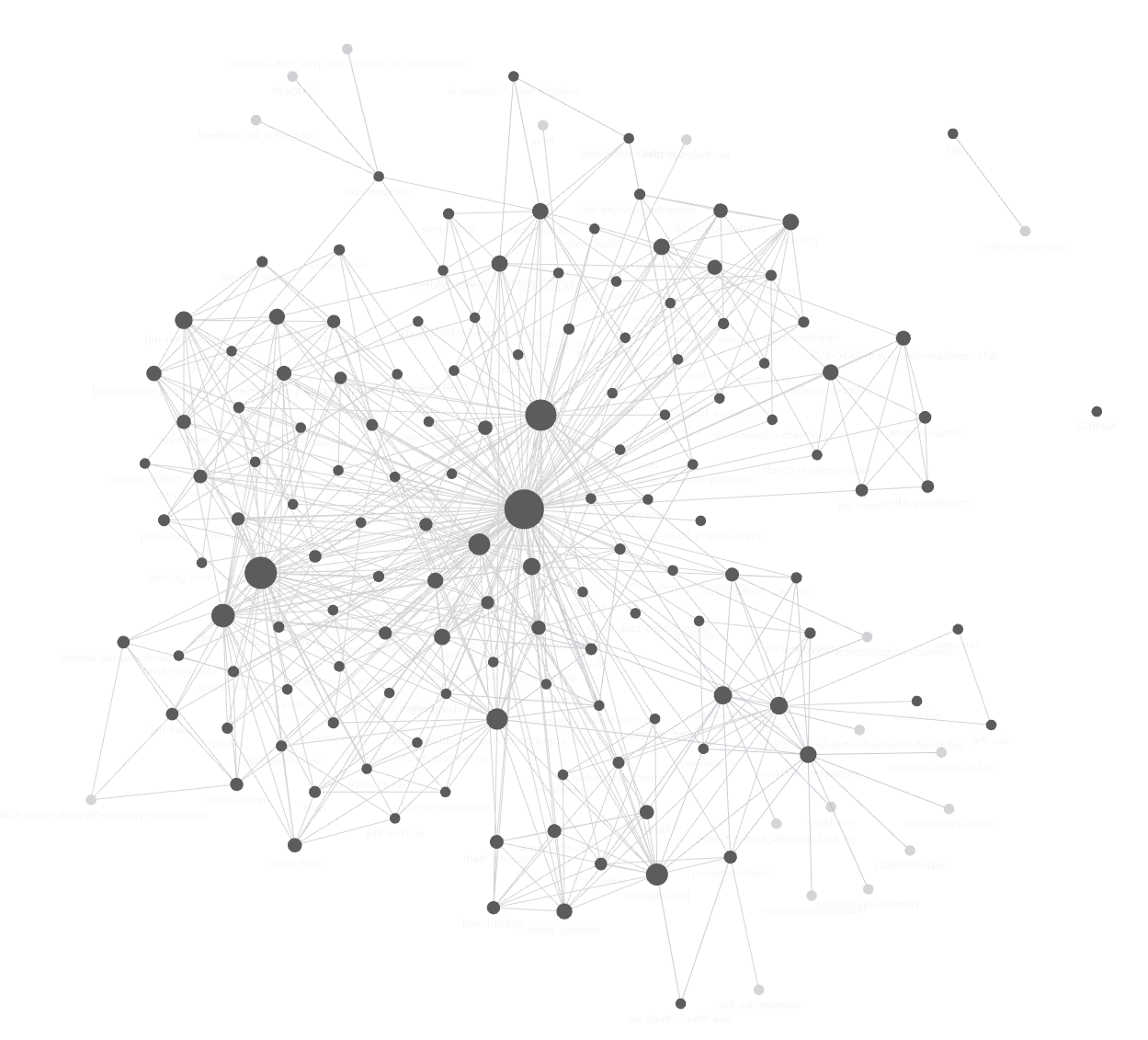
This is my wiki after a month. The dots are pages. The lines are connections, a person who works on a project, a concept that shows up across two clients, an idea that came from a meeting and now lives in three other places. I didn’t draw any of those lines. The AI drew them while I worked.
Your work looks like this too, even if you have never made it visible. The people you collaborate with, the projects you are running, the ideas that keep coming back, the half-finished decisions you keep returning to; they are interconnected in your head the same way they are interconnected in this graph. You navigate those connections every time you sit down to think. They are the closest thing your work has to a brain. They are also the way the AI navigates its own corpus.
Most ways of using AI throw this graph away. You share a small part of your work or spend a few minutes at the start of the chat catching the AI up on the people and the project and the history. You get a useful answer, but you didn’t use all of the information that was available to you. Once you close the chat, you’ll have to share the same information with the AI again. The graph stays in your head, and the AI rebuilds a fragment of it from your prompt every single time. You end up paying the same setup cost over and over or the AI keeps missing key context for knowledge that has been there all along.
The fix is a wiki. Not a Confluence space, not a Notion workspace, not a Google Doc. A wiki is just a folder of plain text files specifically set up for the AI to use and maintain for you that, page by page, externalizes the graph that already lives in your head. Once the graph exists outside of your head, the AI can see it the way you do.
This pattern isn’t new. See Wikipedia. But using it for AI context is. Andrej Karpathy wrote about it in April 20261 and the idea has been adopted across the AI tooling community in the months since.2 I have been running it across my projects for the last month. The image at the top is the result. This article walks you through setting up your own in an afternoon.
What You Need
Claude Code. It’s the AI I use to maintain my own wiki, and it’s what this article is built around. Claude Code reads and writes files on your computer when you talk to it. You describe what you want captured, and Claude Code captures it. You never open a file by hand, pick a path, decide which folder a page belongs in, or what frontmatter it needs. The schema of the wiki is set once by the AI and then maintained. You don’t have to learn it.
If you haven’t installed Claude Code yet, the companion article What to do after you install Claude Code walks through it from scratch. Come back here when you have it running.
Optional, and honestly just because it is cool: Obsidian. It opens any folder of markdown and shows you the graph view that opened this article. When I first populated my wiki, I was fascinated by the shape of my data. The image of the knowledge graph is what hooked me, maybe it will hook you. Note that you don’t need Obsidian, but I recommend it. It’s free, it installs in a minute, it points at the same folder Claude Code is writing to, and seeing the shape of your own thinking is its own kind of motivation.
Set It Up
Make an empty folder somewhere on your computer. Open Claude Code in that folder.
Type this:
I want this folder to be my personal wiki. You are going to maintain it for me. Set up the structure, write a schema file that explains how the wiki works, and create a
/wikiskill I can call as a shortcut for ingest, query, and lint. The wiki is for compiled knowledge about people, projects, and concepts in my work. I will feed you source material and ask you questions. You handle the filing.
Claude Code creates the folders, the schema file, the index, the README, and the /wiki skill that wraps the operations. You approve each write. Setup is done in under a minute. You did not type a path. You will not type a path again.
Populate It Fast
The fastest way to fill a wiki with real content is to point the AI at material you already have. One of the powerful things about Claude Code is that it sits on your files. If you use the files on your computer to seed your wiki, it can take your meeting transcripts, email threads, research articles, project briefs, old notes, a folder of PDFs, a Slack export… anything with substance about your work and make it part of the knowledgebase. Anything that you share will speed up future work as the AI will be able to start with more context than a blank page.
Pick a folder of existing material. It doesn’t have to be organized. Tell Claude Code:
/wiki ingest path/to/folder
That’s it. The skill knows what to do: read each source, summarize it, identify every person, project, and concept, create or update the relevant pages, cross-reference everything, append to the log. A single ingest session typically touches dozens of wiki pages from a handful of sources. You didn’t write any of them. You watched the wiki populate and approved the work. After one afternoon of feeding it material you already had, your wiki has real content drawn from your real work.
This is the difference between an empty wiki you fill by talking to it and a populated wiki that already reflects what you have been doing. The second one is dramatically faster to reach, and it is the version that earns its keep on day one.
Daily Use
Once the wiki has content, three operations keep it alive. The /wiki skill wraps each one.
/wiki ingest <path>. Anytime you have a new source worth keeping, point at the file or folder. The skill does what it did the first time: summary, page updates, cross-references, log entry. Ten or fifteen minutes of your time, mostly review. The wiki compounds.
/wiki query <question>. When you want to know what you know about a person, project, or topic, ask. The skill reads the relevant pages, synthesizes an answer with citations back to the wiki, and offers to file new insights back as page updates. The wiki gets denser every time you use it.
/wiki lint. Once a week, run this. The skill audits the wiki: contradictions between pages, entities mentioned but missing their own page, stale facts past their freshness window. It returns a list. You walk it, telling the skill what to fix. Fifteen minutes of conversation, no files opened.
What Not to Put In
The wiki is for stable, compiled knowledge. Other things look like they belong but do not.
- Today’s to-do list belongs in your calendar or notes app, not the wiki. The wiki isn’t a journal.
- Raw meeting notes should live in a separate folder. The wiki holds the summary and the people, not the transcript.
- Instructions for the AI itself (your tone preferences, your work rules, your guardrails) belong in a separate file the AI reads at the start of every session. Both Claude and ChatGPT have specific places for this. The wiki is for what you know, not for how you want the AI to behave.
This boundary matters. A wiki that absorbs your daily journal becomes a graveyard of dated notes you stop reading. Keep the journal where journals go. Keep the AI behavior rules where AI behavior rules go. Let the wiki be the compiled knowledge.
Where It Goes From Here
The first session earns the wiki its keep. Have your AI compile it in the background and it will populate the structure, content, and cross-references without you having to type it. I’ve been running this about a month. The AI uses the wiki to remember things it or I forgot. It has caught itself about to repeat mistakes. The compounding is quiet and relentless.
You do not need confidence scoring, vector embeddings, or a knowledge graph engine. You need a folder, Claude Code, and the willingness to hand over what you already have.
The graph at the top of this article was nothing but a bunch of unconnected files a month ago. The connections lived in my head and in my files. The wiki is just where they became usable as a whole in my workflow.
- Karpathy, A. LLM Wiki, GitHub Gist, April 4, 2026, gist.github.com/karpathy/442a6bf555914893e9891c11519de94f. Original sketch of the personal wiki maintained by an LLM. The pattern in this article is a non-technical-friendly version of what Karpathy laid out. ↑
- tjiahen, awesome-llm-wiki: Curated list of tools, schemas, and implementations for the LLM-maintained personal wiki pattern, GitHub, May 2026, github.com/tjiahen/awesome-llm-wiki. Catalogs more than twenty implementations of the Karpathy pattern across CLI tools, Claude Code plugins, Obsidian integrations, and MCP servers. The pattern is converging quickly; this list is the closest thing to a community-maintained roll-up. ↑
Get new articles by email
New essay every week or so. No spam, no filler. Unsubscribe with one click.